Shopify PDF stamping that marks every copy with its buyer
Imprint Files stamps your customer’s details onto the PDF at the moment they download it. The stamp identifies the buyer and can discourage sharing. Stamping is on every plan, including Free. Basic and Premium let you choose what the stamp says, where it sits and how it looks.
Free plan available. 14-day free trial on Basic and Premium.
A PDF that names its buyer
A plain PDF download gives every buyer an identical file. Once it’s posted to a sharing site or passed around a group chat, it has no buyer-specific mark to help you trace its source.
A stamp changes that. When a customer opens your ebook, knitting pattern or sheet music and sees their own email on the page, uploading the file means uploading their email with it. That’s a good reason to think twice. And if a copy does get out, the stamp tells you whose it was.
What you can put on the stamp
On the Free plan, every PDF gets the standard stamp: the customer’s email, centered at the bottom of the page, in 12px gray at 50% opacity.
On Basic and Premium, you write the stamp yourself: a template of up to 500 characters that mixes your own text with variables filled in from the order. Licensed to {name} - {email} becomes “Licensed to John Doe - [email protected]”.
Variables you can insert
Basic +{email}- The customer's email address.
{name}- The customer's full name.
{order_number}- The order number your customer sees, like #1001.
{order_id}- Shopify's internal order ID.
{date}- The date the file is downloaded, like 2026-10-16.
{company}- The company from the billing, shipping or customer's default address. On Premium, the company that placed a B2B order.
{copy_id}- A code unique to each downloaded copy.
{licence_id}- The order’s licence code, the same on every file.
{quantity}- How many copies of the product the order bought.
{copies}- The word “copy” or “copies” to match the quantity, in your Shopify admin’s language.
Custom fields from checkout
Selling a licence for a named person, or a personalized edition? Add up to 5 custom variables that read what your customer typed in a product page field (a line item property) or a cart attribute. A variable named licensee becomes {licensee} in your template.
Copy and licence codes
Every download gets its own copy code, and every order a licence code. Put {copy_id} or {licence_id} in the template, or switch on Always append the copy code. A copy code identifies one download; a licence code identifies the order. Neither prints the buyer’s name or email. How copy tracking works.
Missing values drop out
If a customer left the company field empty, the template Company: {company} - Email: {email} prints just “Email: [email protected]”. The label goes with the empty value, so there’s never a stray “Company:” on the page.
Where the stamp goes and how it looks
First page or every page
All plansTurn on First page only to stamp page 1 and leave the rest of the document clean. Leave it off and the stamp repeats on every page, which is harder to strip out. You can also switch stamping off for a single product, or for the whole store.
Position and style
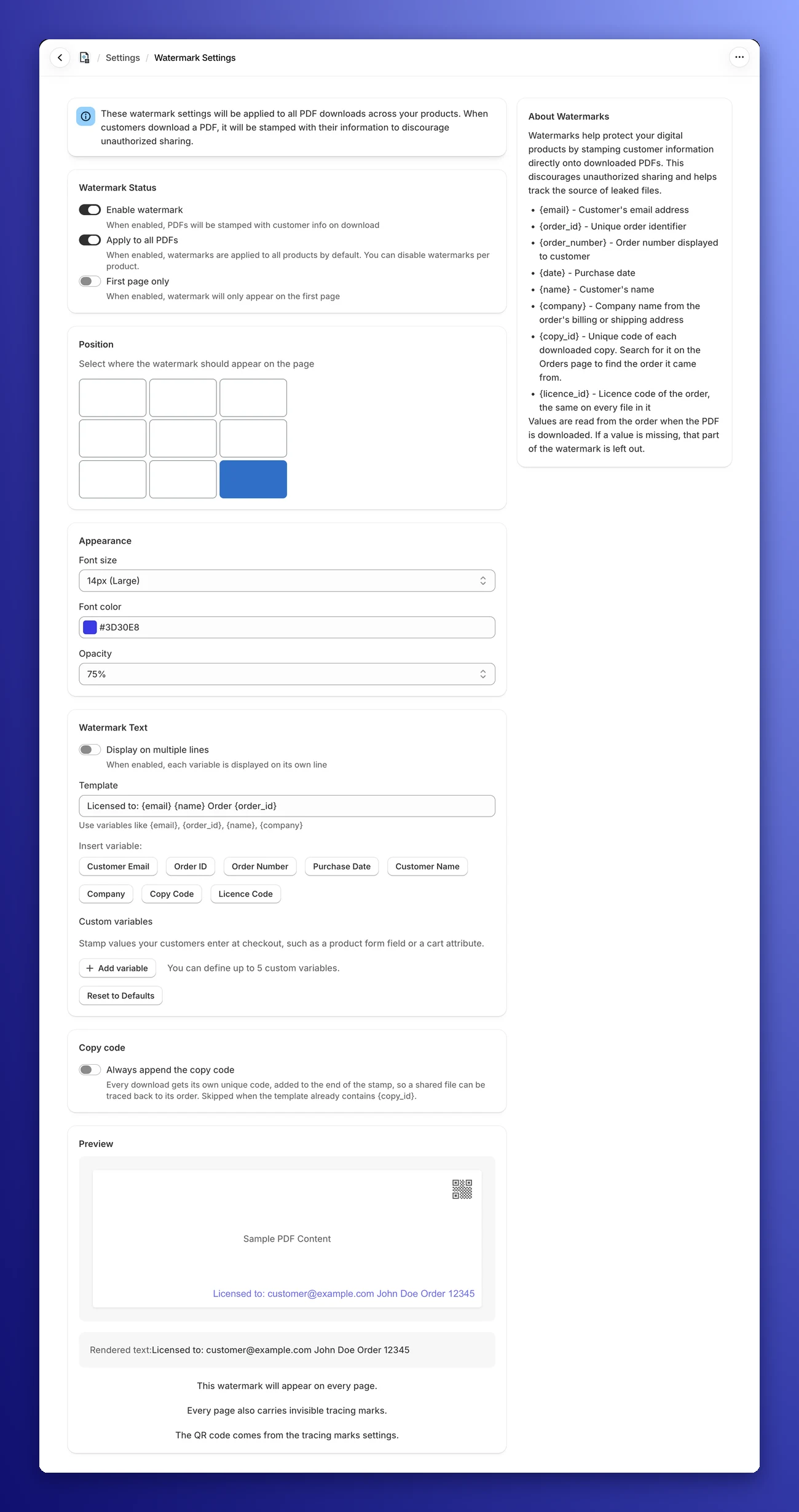
Basic +Click one of 9 boxes on a 3×3 grid to place the stamp, from top left to bottom right, so it stays clear of your content. Pick a font size from 8px to 24px, any color, and an opacity of 25%, 50%, 75% or 100%. Lower opacity lets your own text show through.
One line or several
Basic +Switch on Display on multiple lines to stack the stamp. Each variable gets its own line with the text in front of it, and separators like “ - ” are dropped. Text that ends in a colon, like “Email:”, sits on its own line above the value.
Long stamps shrink to fit
If a line is wider than the page, say a long email address plus the copy code, Imprint sets that line in a smaller font so it fits between the margins.
- Template
- Licensed to {name} - {email} - Order {order_number}
- On one line
- Licensed to John Doe - [email protected] - Order #1001
- On multiple lines
- Licensed to John Doe
[email protected]
Order #1001
How PDF stamping works
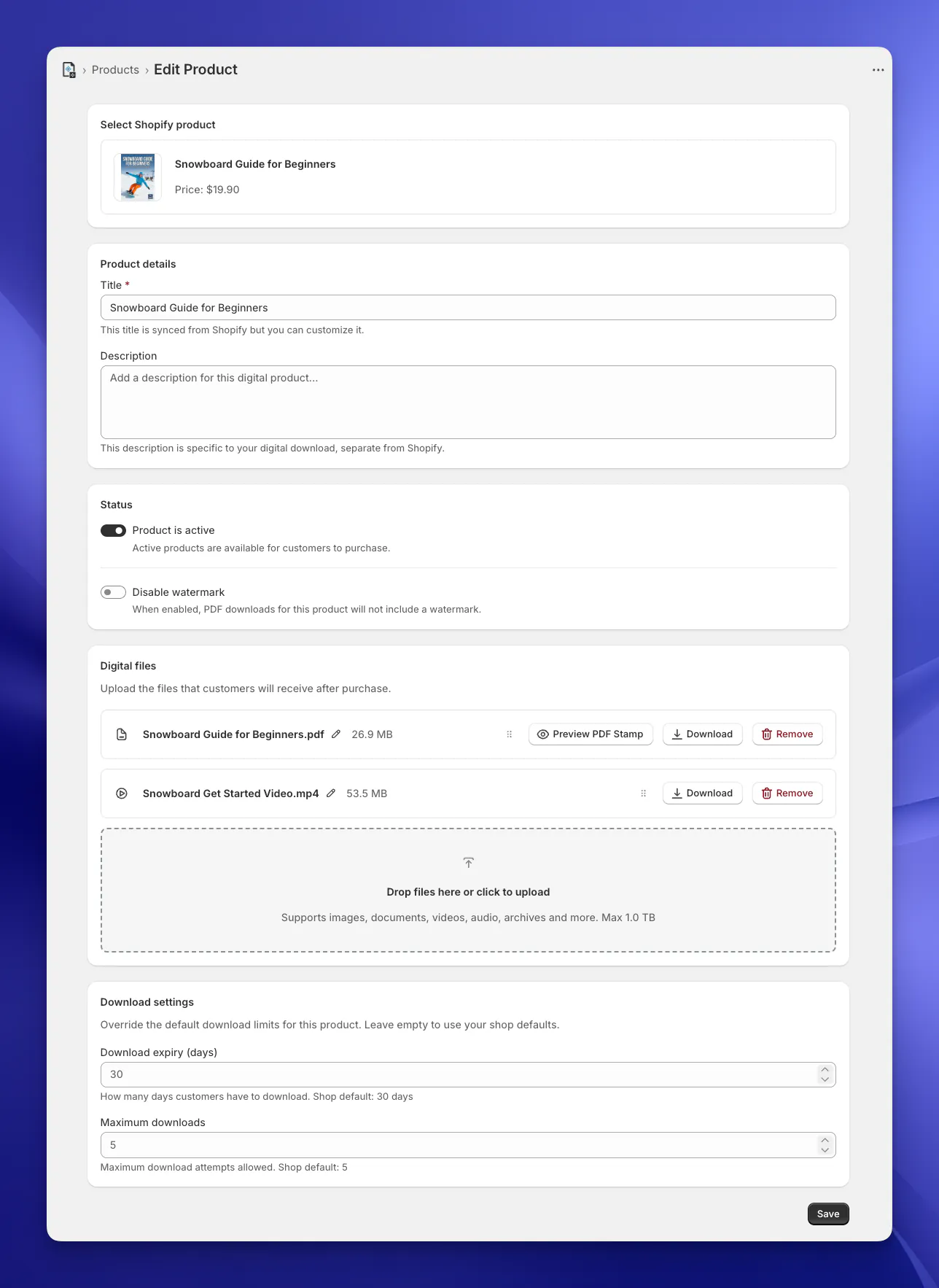
Upload your PDF
Connect a Shopify product in Imprint and drag in one master copy of the file.
Check your stamp
Free uses the buyer’s email. On Basic and Premium, choose the text, position and style under Settings → Watermark. Use Preview PDF Stamp on a product to check the result on your own file.
Your customer clicks Download
Imprint reads their order, fills in the variables and stamps the PDF right then, before streaming it to their browser. For most files this takes a moment.
New downloads use your current settings
Each download is stamped fresh, with your settings at that moment. Change your template today and tomorrow’s downloads use it, even on older orders.
What your customer sees, and what you see
In your customer’s PDF
Their details, on the page and in the position you chose. It’s still an ordinary PDF that opens in whatever reader they already use. Two customers who buy the same ebook get two different files.
In your Imprint admin
Settings → Watermark holds every control on one page: the switches, the position grid, font size, color and opacity, the template with its Insert variable buttons, custom variables and the copy code switch.
The preview at the bottom shows a sample page with your stamp and the exact text that will be printed. If you use tracing marks with a QR code, it shows that too, so you can keep the stamp out of its corner.
Which plan includes what
Every plan stamps your PDFs. Basic lets you design the stamp, and Premium adds marks a leaker can’t see.
| Feature | Free$0 | Basic$8.99/mo | Premium$18.99/mo |
|---|---|---|---|
| PDF stamping at download | Included | Included | Included |
| First page only or every page | Included | Included | Included |
| Switch stamping off per product | Included | Included | Included |
| Stamp text | Customer email | Your own template | Your own template |
| Position, size, color and opacity | Not included | Included | Included |
| Multiline stamps | Not included | Included | Included |
| Up to 5 custom variables | Not included | Included | Included |
| Copy and licence codes on the stamp | Not included | Included | Included |
| Hidden tracing marks and QR code | Not included | Not included | Included |
| Licence stamping (each product’s own watermark text, B2B company names) | Not included | Not included | Included |
Paid annually, Basic is $89.90 and Premium $189.90 a year. Both come with a 14-day free trial. Compare every plan
PDF stamping questions
Can I stamp the buyer's name on the PDF, or only their email?
On the Free plan, the stamp is the customer's email. On Basic and Premium you write your own template, so you can add their name, order number, date, company, copy and licence codes, and up to 5 custom fields from checkout or a product form.
Does the stamp go on every page?
You choose. With First page only switched on, only page 1 is stamped. With it off, the stamp repeats on every page, which makes it harder to remove. Both options are on every plan.
When is the PDF stamped?
At the moment your customer downloads it. Imprint reads the order, fills in the details and stamps the file before streaming it to their browser, which takes a moment for most files. Nothing is stamped in advance.
Can I stamp videos, images or ZIP files?
No. Stamping and tracing marks work on PDFs only. Other files are still delivered through unique download links with your expiry dates and download limits, but their content isn't changed.
Can someone remove the stamp?
A determined person can crop, cover or edit out a visible stamp. That is why Premium adds tracing marks, which hide the copy code in tiny margin text and in the file’s document properties, plus an optional QR code, so a leaked copy can still be traced.
Docs and guides
- DocsWatermark settingsEvery switch, variable and style option, with examples.
- DocsCopy trackingCopy codes, licence codes, the Download Log and Find Order by Code.
- DocsTracing marksHide the copy code inside every PDF, with an optional QR code.
- GuideVisible vs invisible watermarksWhat each kind of mark is good for, and why you might use both.
- GuideHow to sell PDFs on ShopifyFrom setting up the product to delivering the file.
- FeatureLeak tracingUpload a leaked copy and find out whose download it was.
Stamp your next PDF sale
Install Imprint Files for free and every PDF you sell is stamped with its buyer’s email from the first order. Upgrade when you want your own template.