Trace a leaked PDF back to its Shopify order
Found your ebook on a file-sharing site? Upload the copy to Imprint Files to see the codes and customer details that survive in the file. Review any matching order and download, along with the confidence level, then draft a takedown notice.
Part of Premium: $18.99/month or $189.90/year, with a 14-day free trial.
From a name on the page to one exact download
A visible stamp with the buyer’s email discourages sharing, but it can be cropped, covered or edited out. And an email points to a customer, not to a copy. If they downloaded the file three times, it can’t tell you which download got out.
Leak tracing works from codes. Every download gets its own copy code, and on Premium that code is hidden inside the PDF where a leaker is unlikely to notice it. When a copy turns up online, Imprint reads the code and opens the download it came from.
For the whole process, from spotting a leak to getting it taken down, read how to find who leaked your PDF.
What every copy carries
Copy codes and licence codes
Basic +Each download gets a copy code like IMP-7K3QZ9M2PXP, and each order a licence code like H4R8TW2N. You can print either one in the visible stamp. Copy codes have a built-in check that helps catch typing errors.
Hidden tracing marks
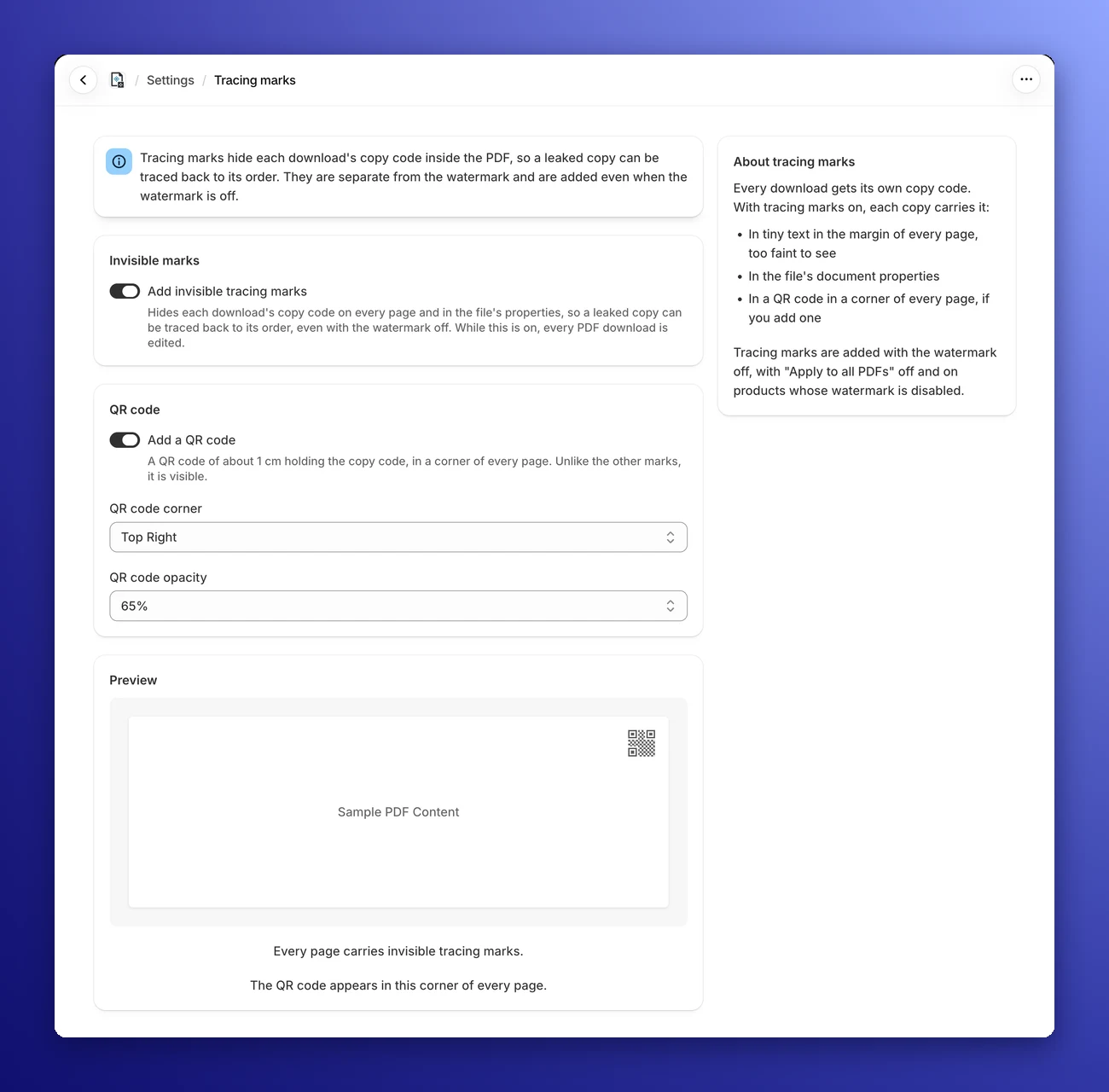
PremiumWith tracing marks on, every page carries the copy code in tiny text in the bottom-left margin, too faint to see when reading or printing. The codes are also saved in the file’s document properties. The marks are added even when the visible watermark is off.
An optional QR code
PremiumA QR code of about 1 cm holding the copy code, in the corner you pick, on every page. Like a visible text stamp, it can survive printing, scanning and screenshots if it remains readable. Imprint can read the QR code automatically.
How leak tracing works
Save the copy you found
Download it and keep it exactly as you found it, without printing or re-saving it. Note the web address of every page that shares it.
Upload it on the Leak tracing page
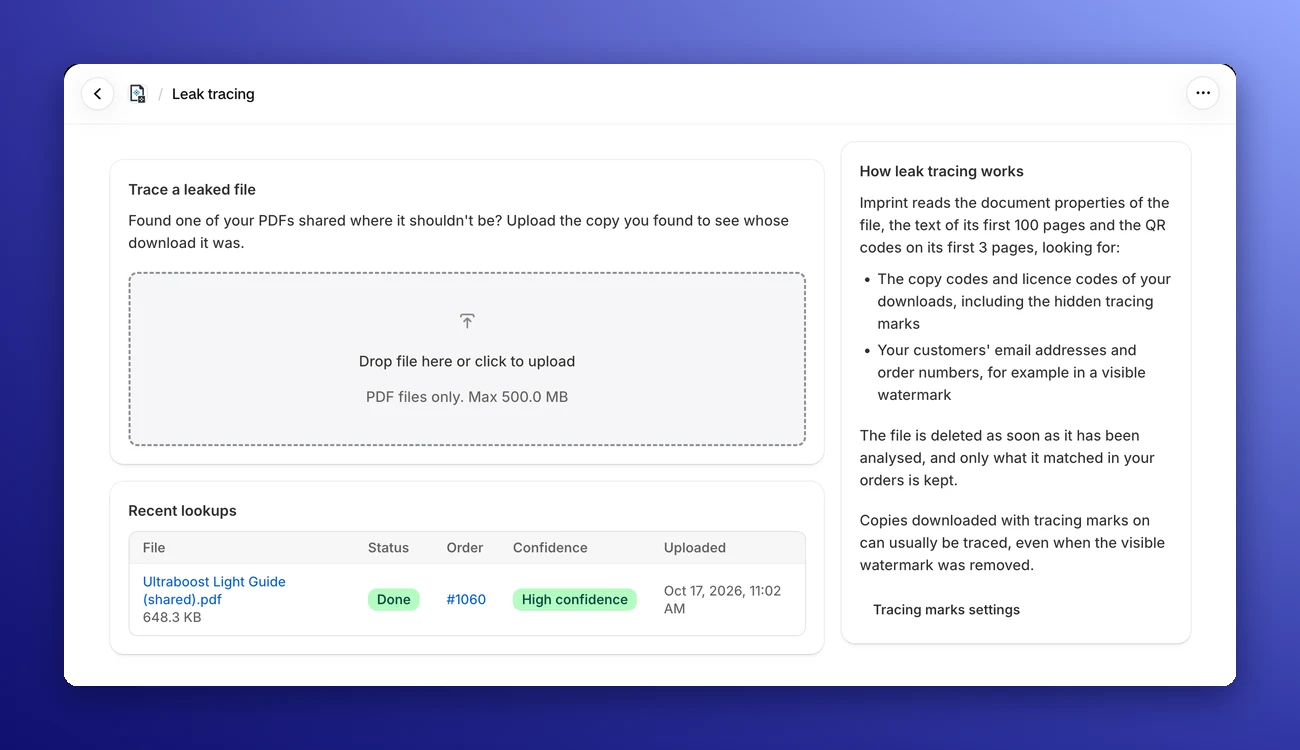
Drag the file into Trace a leaked file. It takes PDFs up to 500 MB, and uploads don’t count toward your storage. Found screenshots instead? Save them as one PDF, with the QR code pages among the first three.
Imprint reads the file
It searches the first 100 pages and the document properties for copy codes, licence codes, customer emails and order numbers, and tries to read QR codes on the first 3 pages. This usually takes less than a minute.
Open the result
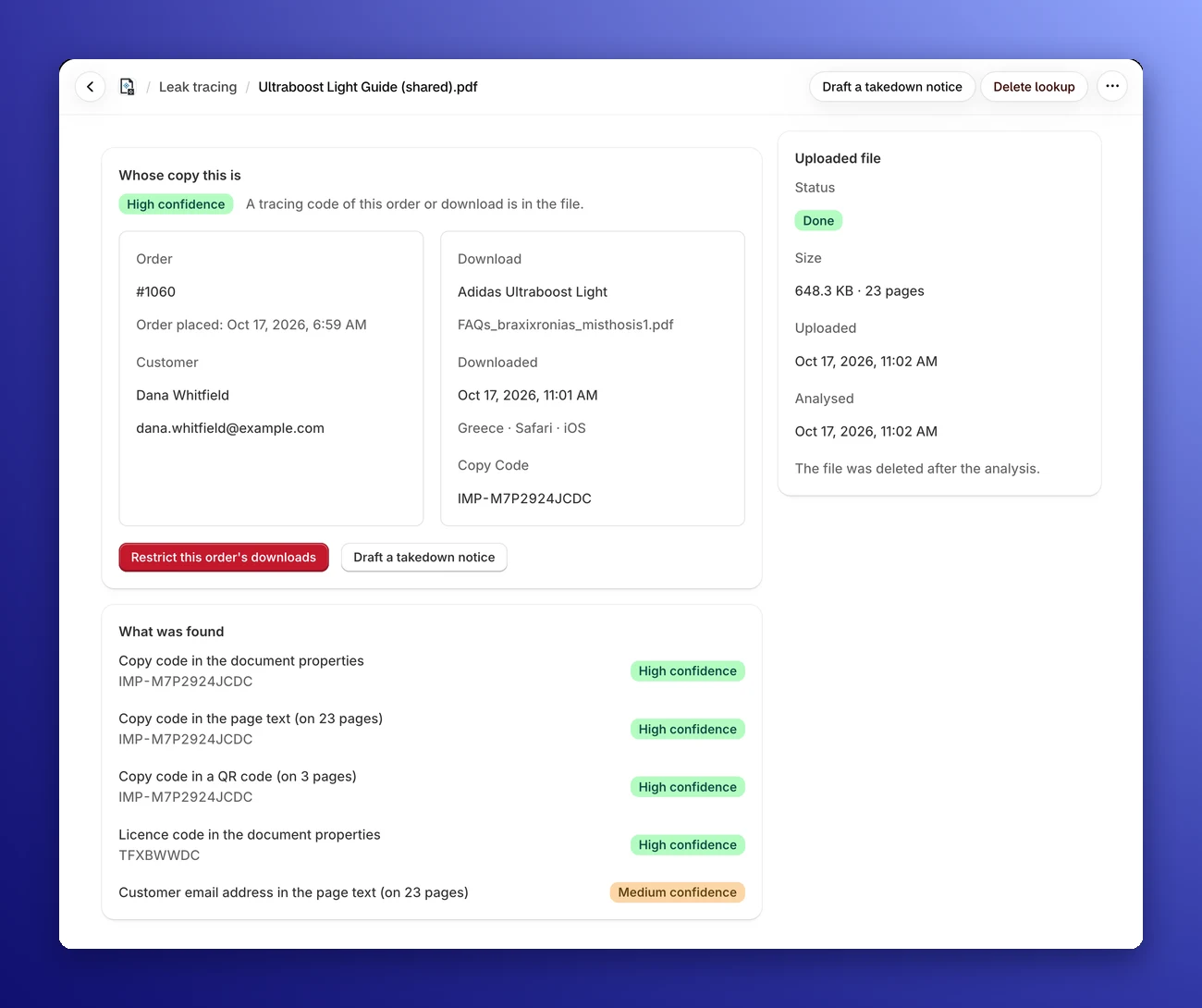
Whose copy this is shows any matching order and customer. When a copy code is found, it also identifies the download, with its product, file, time, country and device.
Act on it
Click Restrict this order’s downloads to stop the customer’s links, then draft a takedown notice for the site hosting the copy.
How sure is the match?
High confidence
A copy code of this download is in the file (in the text, the document properties or the QR code), or the order’s licence code is in the document properties. Review the order and available download details before acting.
Medium confidence
The order’s licence code is in the page text, or the customer’s email address is in the file, but there’s no copy code. Check the details before you act.
Low confidence
Only weak clues point to this order. Check the details before you act.
A copy code identifies one download. A licence code identifies an order, which may include several downloads. Even a high-confidence match identifies the purchased copy, rather than proving who shared it.
An order number on its own only counts when another clue already points to the same order, and your store’s own email addresses never count. No match at all usually means the copy predates your tracing marks, or its stamp and properties were removed.
A record on the order
Leak Lookups
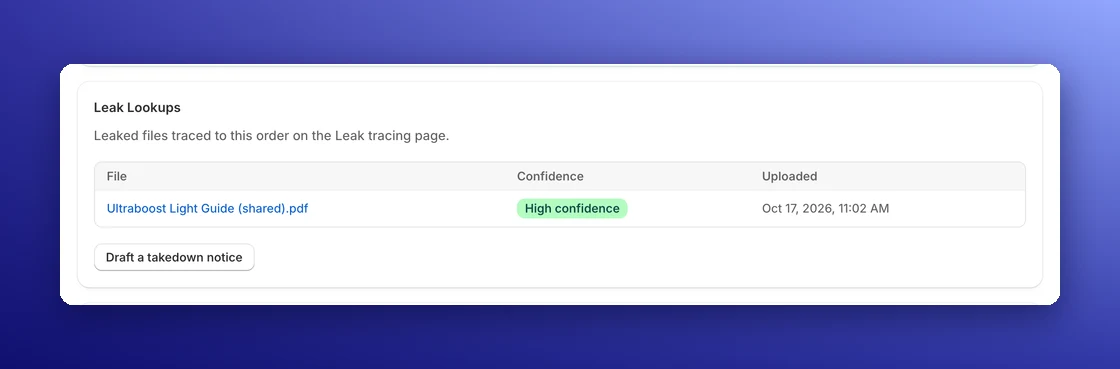
Every traced file is listed on its order page under Leak Lookups, with the file name, the confidence of the match and the upload date. It sits below the order’s Download Log, so the leak and the download it came from are on one page. Lookups stay until you delete them.
Your uploads stay private
The file you upload is deleted as soon as it has been analyzed, whatever the outcome. Only what it matched in your orders is kept.
Draft a DMCA or EU takedown notice
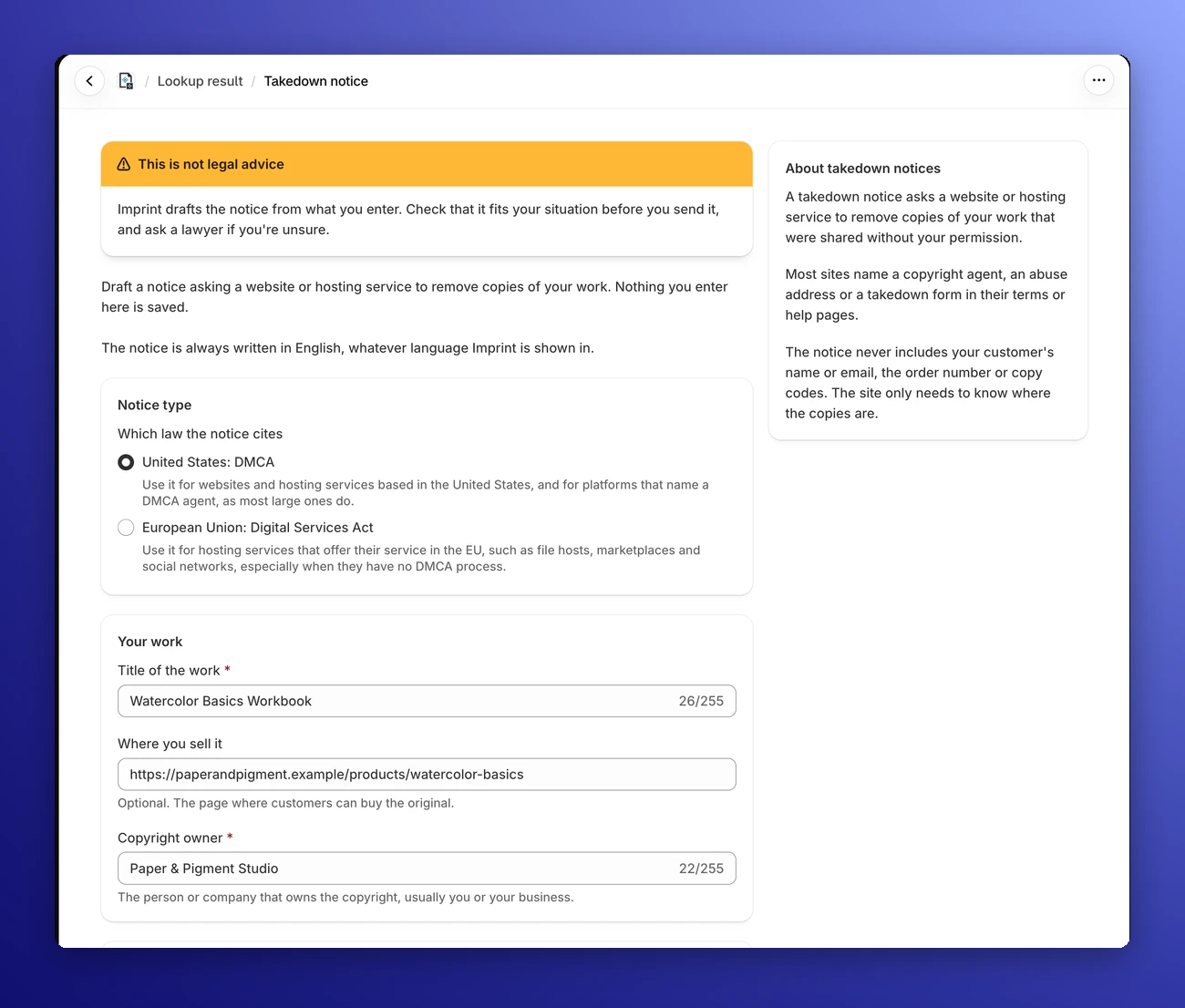
From a lookup result or the order page, click Draft a takedown notice. Pick the law the notice cites: the US DMCA, for sites based in the United States and platforms that name a DMCA agent, or the EU Digital Services Act, for hosting services that offer their service in the EU.
The title of the work is filled in for you. Add the copyright owner, up to 50 web addresses of the copies, your contact details and a typed signature, and Imprint writes the notice in English, ready to copy or download as a .txt file.
The notice never includes your customer’s details, and nothing you type is saved. It’s a draft, not legal advice, so check it fits your situation. The DMCA takedown notice guide explains where to send it.
Which plan includes what
Every plan records a copy code for every download, so your history is there when you upgrade. On Basic, you can type a code you find in a leaked stamp into Find Order by Code. Premium hides the codes in the file and does the tracing for you.
| Feature | Free$0 | Basic$8.99/mo | Premium$18.99/mo |
|---|---|---|---|
| A copy code recorded for every download | Included | Included | Included |
| Copy and licence codes in the visible stamp | Not included | Included | Included |
| Download Log on each order | Not included | Included | Included |
| Find Order by Code | Not included | Included | Included |
| Hidden tracing marks and QR code | Not included | Not included | Included |
| Upload a found copy to trace it | Not included | Not included | Included |
| DMCA and EU takedown notice drafts | Not included | Not included | Included |
Paid annually, Basic is $89.90 and Premium $189.90 a year. Both come with a 14-day free trial. Compare every plan
Leak tracing questions
Can I trace a copy that was downloaded before I turned on tracing marks?
Only from what's still in it. Downloads made before the marks were on don't carry them, but if the copy's visible stamp shows a copy code, a licence code or the customer's email, leak tracing can still match it to an order.
What if the leaker printed, scanned or screenshotted the PDF?
Printing to images, scanning and screenshots remove the hidden margin text and the document properties. The QR code survives if it was switched on when the copy was downloaded and is still readable on one of the first 3 pages, which is where Imprint looks for it.
Will tracing marks change how my PDF looks?
The hidden marks are designed to be unobtrusive: faint margin text and entries in the document properties. The optional QR code is visible and sits on a white square that covers content beneath it. Preview your file to check the layout.
Does the takedown notice name my customer?
No. The notice never includes your customer's name or email, the order number or the copy codes. The website only needs to know where the copies are.
Will leak tracing always identify a copy?
No. Tracing depends on surviving codes or customer details. Marks can be removed, and a licence code identifies an order rather than a single download. Review any match before acting. Even a high-confidence match doesn't prove who shared the file.
Docs and guides
- GuideHow to find who leaked your PDFThe full walkthrough, from spotting a leak to getting it removed.
- GuideHow to send a DMCA takedown noticeWhat goes in a notice and where to send it.
- DocsLeak tracingUploading a file, statuses, results and confidence levels.
- DocsTracing marksMicro-text, document properties, the QR code and what can remove them.
- DocsTakedown noticesEach field of the notice form, and how to send the result.
- FeaturePDF stampingStamp every PDF with its buyer’s details as they download it.
Find out whose copy it was
Start the 14-day Premium trial and enable tracing marks to give future PDF downloads copy codes you can look for if a file leaks.