Free Samples
Offer a free sample of your PDF in exchange for an email address. Visitors get a download link by email, and each sign-up becomes a tagged Shopify customer you can follow up with.
Last updated
A free sample gives visitors the first pages of your PDF, or a separate excerpt, in exchange for their email address. They sign up on the sample page and get a download link by email. Each sign-up becomes a customer in your Shopify store, tagged so you can follow up with Shopify Email or Shopify Flow.
The sample download is protected like a purchase: Imprint stamps it with the visitor's email and gives it a copy code.
How It Works
- You turn on a free sample on a PDF's page in Imprint.
- You share the sample page's link, put a button on your product page, or add the Free sample block to your theme.
- A visitor enters their email on the sample page. They can also tick a box to agree to your marketing emails.
- Imprint emails them a download link and adds them to your Shopify customers with the sample tags.
- When they download the sample, they get your watermark with their email. If they ticked the box, they're subscribed to your marketing emails at this point.
Turning On a Free Sample
- Open the product from the Products page and click Preview PDF Stamp next to its PDF.
- Find the Free sample section in the right-hand column.
- Under Sample, choose what visitors get:
- The preview: the first pages of the PDF with the overlay text, as set under Public preview. These pages stay private unless you also share the public preview link.
- A PDF of its own: upload a separate PDF, such as an excerpt or a chapter. It counts toward your storage.
- Click Turn on sample.
If you choose the preview and the PDF doesn't have one yet, Imprint builds it first, using your default preview settings. The section says when the preview is being generated, and the sample page opens once it's ready.
Keep the sample behind the form. If the sample uses the preview and the public preview link is also on, anyone can read those pages without signing up. To prevent this, click Turn off public link in the Public preview section, or give the sample a PDF of its own.
Once the sample is on, the section shows how many people signed up for it, and:
- Sample page link: click Copy link to copy it, or Open to see the page.
- Button code: the code of a Get a free sample button that opens the sample page. Click Copy code to copy it.
Paste the button code into the product's description in Shopify, using the description editor's HTML view, or into a Custom Liquid block on your theme's product page. For a button or an email form that you can set up without code, use the Free sample block in the theme editor.
The product's page in Imprint also lists each PDF's sample page link in the Previews and samples card.
Changing or Turning Off a Sample
- To switch between the preview and a PDF of its own, or to upload a different PDF, make the change and click Save.
- Click Turn off to stop the sample. Its page closes, and the links already emailed stop working too.
When you switch to the preview or turn the sample off, any PDF uploaded for the sample is deleted.
The Sample Page
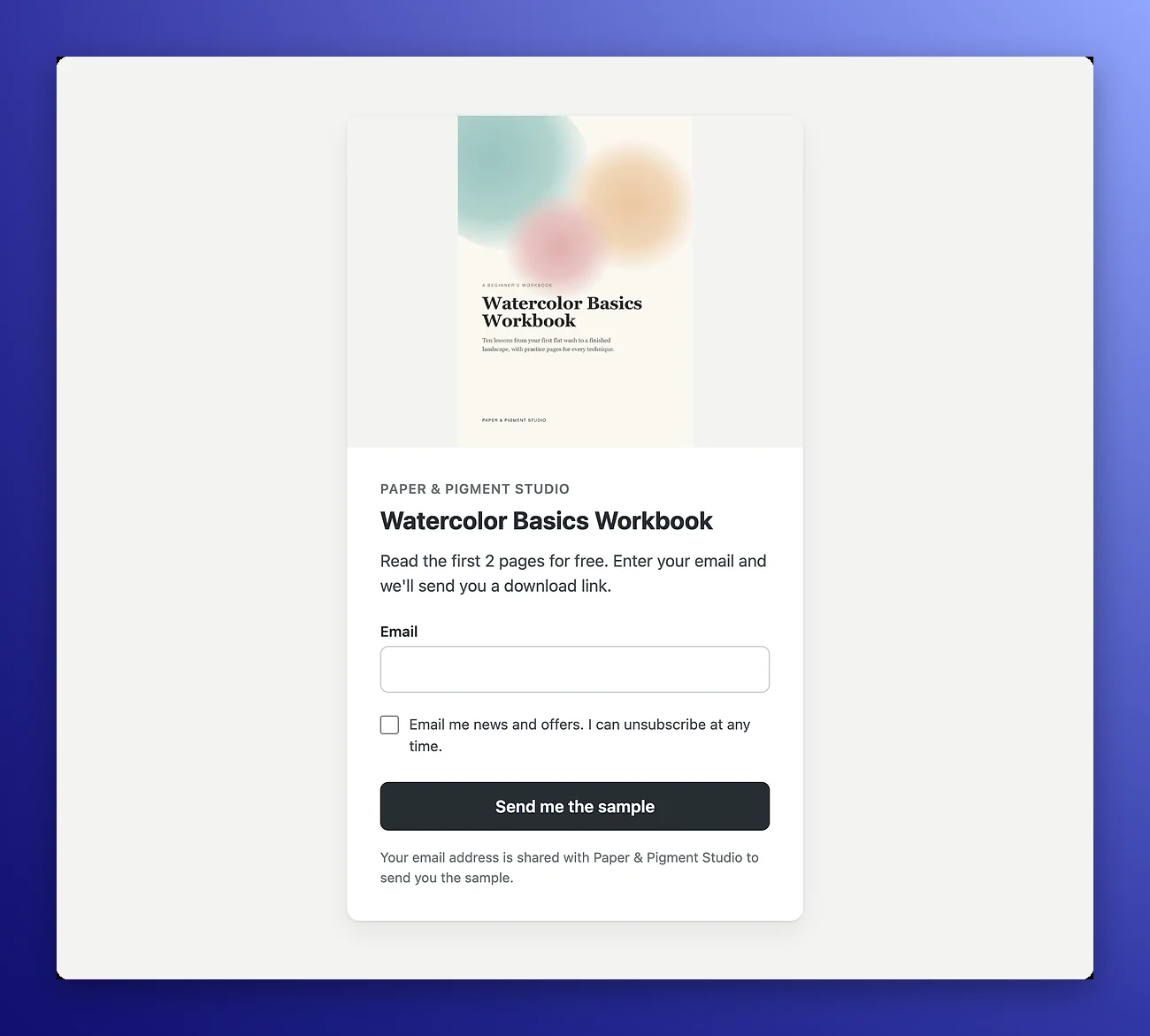
The sample page is hosted by Imprint and is shown in the language you use Imprint in. It shows:
- The product's title and image from Shopify.
- How many pages the sample has, when it uses the preview.
- An Email field and a Send me the sample button.
- Your marketing consent text next to a box that is never ticked in advance.
- A note that the visitor's email address is shared with your store to send them the sample.
After signing up, visitors see a Check your inbox page with a Back to the store button, or go to your own page if you set a Redirect URL (see Sample Settings).
If the same email asks for the same sample again while its link still works, Imprint emails the same link again instead of creating a new one. Asking again doesn't add downloads.
The Email and the Download
The email has the subject Your free sample of followed by the product's name, and a Download your sample button. It's sent like your download emails, from your own email server if you set one up in Email Settings.
The downloaded file's name ends in _sample. Your watermark is stamped on it as on a purchase, with these differences:
{email}is the visitor's email address.{order_number}is the word Sample.- Variables that come from an order, such as the customer's name, the order ID, the licence code,
{quantity}and{copies}, are empty and drop out of the stamp. The copy code works as usual. - On Premium, a product with its own watermark text stamps that text on its samples too. Make sure it includes
{email}, so the sample still carries the visitor's email.
If you use tracing marks, the sample gets them too.
Shopify Customers and Tags
Every sign-up is added to your Shopify customers, or updated if a customer with that email already exists. Imprint tags them with:
imprint-sample, on every sign-up.imprint-sample-followed by the product's handle, for exampleimprint-sample-my-cookbook.- Any Extra customer tags you set under Sample Settings.
Marketing Consent
Visitors who tick the consent box are subscribed to your marketing emails when they first download the sample, not when they sign up. A visitor who leaves the box unticked is never unsubscribed if they had already agreed before.
Imprint keeps the consent text each visitor agreed to and when they agreed, so you can show what they signed up for.
Following Up Automatically
Use the tags to start an automation:
- Shopify Email: create an automation for customers who get the
imprint-sampletag, or the tag of one product. - Shopify Flow: start a workflow with the Customer tags added trigger and check for the tag.
Approve the new permissions. Free samples need two Shopify permissions that Imprint didn't ask for before: to manage customers, and to answer requests from your storefront (for the theme block). Shopify asks you to approve them the next time you open Imprint. Until you do, samples are still sent, but sign-ups aren't added to your Shopify customers. Settings → Samples shows how many are waiting, and they're added once you approve.
Sample Settings
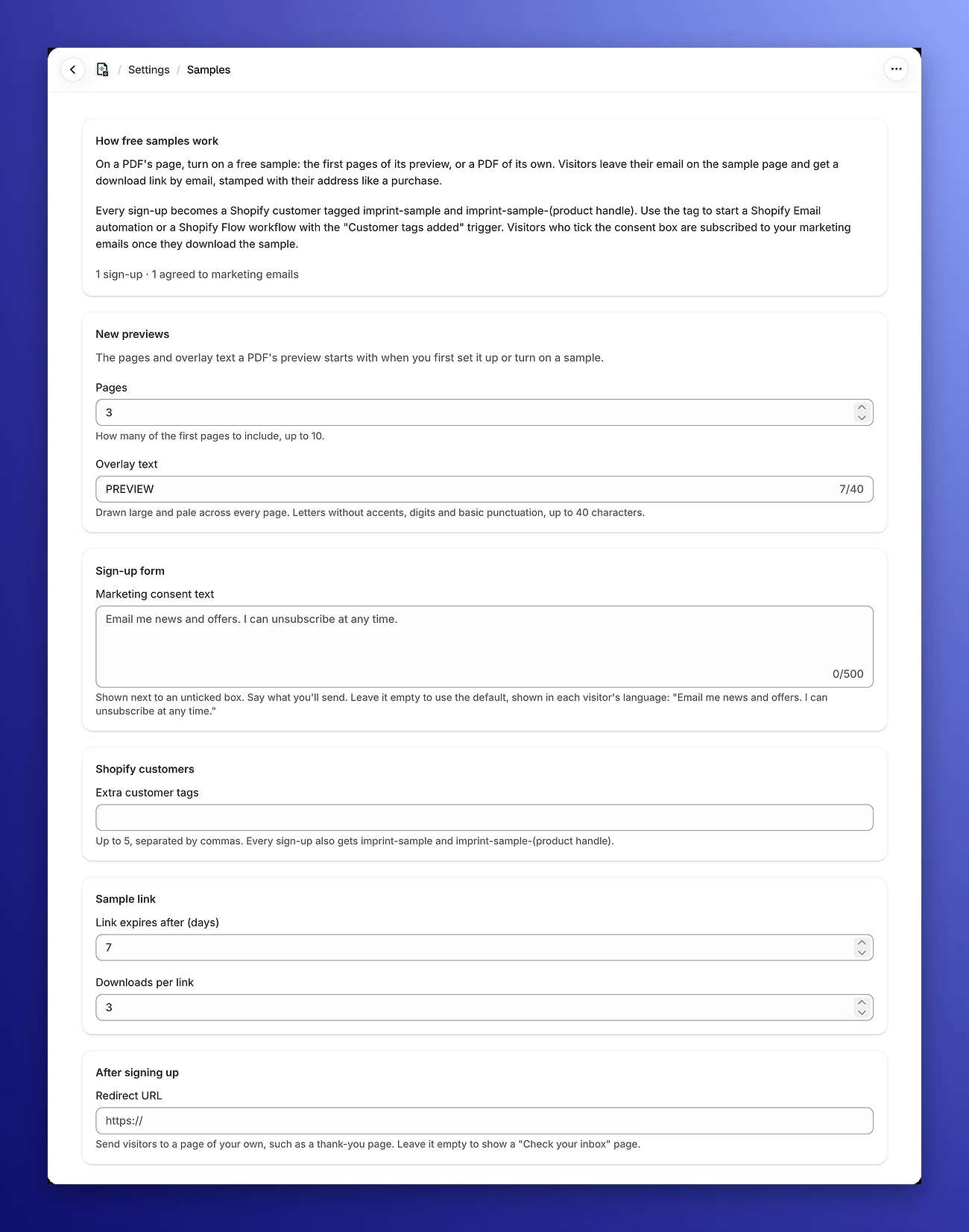
Go to Settings → Samples to set how all your samples work. The top of the page shows how many people signed up and how many agreed to marketing emails.
- New previews: the Pages and Overlay text a PDF's preview starts with when you first set it up or turn on a sample. Existing previews keep their own settings.
- Marketing consent text: the text next to the consent box, up to 500 characters. Say what you'll send. Leave it empty to use the default text, which is shown in each visitor's language: "Email me news and offers. I can unsubscribe at any time." Your own text is shown as you wrote it, in every language.
- Extra customer tags: up to 5 tags, separated by commas, added to every sign-up. Tags can have letters, digits, spaces, hyphens and underscores, up to 40 characters each. They can't start with
imprint-sample, which Imprint adds itself. - Link expires after (days): from 1 to 365. New stores start at 7 days.
- Downloads per link: from 1 to 20. New stores start at 3 downloads.
- Redirect URL: a page of your own to send visitors to after they sign up, such as a thank-you page. It must start with
https://. Leave it empty to show the Check your inbox page.
Changes apply to sign-ups made after you save. Links already sent keep their limits.
Tracing a Sample Copy
Sample downloads get copy codes like any other download. If you find a code from a sample and look it up with Find Order by Code or leak tracing, Imprint tells you it belongs to a free sample, with the email it was sent to and when. Samples have no order, so there's no order page to open.
Your Plan and Free Samples
Free samples are available on the Basic and Premium plans. If you move to the Free plan:
- Sample pages close, and the theme block disappears from your store.
- Links already emailed keep working until they expire. To stop them, turn off the sample on the PDF's page.
- Settings → Samples shows an upgrade message.
Privacy
You decide what to send the people who sign up, so the consent text is yours to write. Make it say what you'll send them. Imprint keeps each sign-up's email, the consent text they saw and when they agreed, and a scrambled version of their IP address, which is removed after 24 months.
A sign-up's details are deleted when Shopify asks to erase that customer's data, when you delete the product, and when you uninstall Imprint. See the Privacy Policy for the details.
Related Pages
- Public Previews: share the first pages of a PDF with anyone, on every plan.
- Free Sample Block: add a sample button or email form to your product pages from the theme editor.
- Copy Tracking: copy codes and Find Order by Code.
- Offer a free PDF sample for an email: our guide to choosing a sample and following up with the people who sign up.
Public Previews
Let shoppers read the first pages of your PDF before they buy. Imprint builds a short preview with an overlay text and gives you a link and a button for your product page.
Free Sample Block
Add Imprint's Free sample block to your product pages in the Shopify theme editor, as a button to the sample page or an email form, without editing any code.